


AR Art Draw: Trace & Paint
4.444.00 Reviews
App Specs
- Version
- 2.1.1
- Updated On
- License
- Free
- Downloads
- 1,000,000+
- Developer
- Appollo Studio
- Categories
- Art & Design
- Platform
- Android
Screenshots

 Analysis by AppCompare
My main impression of AR Art Draw: Trace & Paint is that it turns the first, often intimidating step of drawing into a practical activity: choose a picture, set up a sheet of paper, and follow the image shown through your phone. That makes it inviting for beginners and anyone who enjoys hands-on crafts. It is less compelling if you want a full digital illustration studio or a tool that teaches drawing fundamentals without tracing.
A useful bridge from screen to paper
The appeal is in the mix of a camera view and a real drawing surface. Instead of copying a reference by glancing back and forth between a screen and a page, I can keep the guide in view while working. That small change makes the process feel more approachable, especially for a simple gift illustration, a sketchbook warm-up, or a rainy-day activity with a child. The result still depends on your hand and patience, but the image gives you a starting point when inventing proportions from scratch feels difficult.
It helps to think of the app as a tracing aid rather than an automatic art maker. The overlay can guide where lines go, but it cannot choose how carefully you draw them or make every mark expressive. I found that distinction useful: it keeps expectations realistic and makes the app a better fit for people who want to practice by doing, not just produce a finished-looking picture with one tap.
What the AR workflow is good at
When I want to draw from a photo, the usual alternatives are to look at the phone beside the page, print a reference, or use a digital drawing app. Each has a trade-off. A separate reference is simple, but my eyes keep shifting between the image and paper. A digital canvas offers layers and editing, but it does not give the same pencil-on-paper experience. AR Art Draw’s approach is appealing when the physical marks are part of the fun and I want the reference aligned with the page as I work.
For steadier results, I would set the phone on a stand or another secure support before starting, then settle the paper and device before tracing. Small shifts can make an overlay harder to follow, so avoiding unnecessary movement matters more than rushing into the first line. I would also begin with a simple image and a lightly drawn outline. If the proportions look off, it is much easier to adjust a few faint marks than to erase a heavily shaded drawing.
Another practical choice is to use the image as a guide rather than a rule. I might trace the broad outline first, then lift the phone and add details from the paper itself. That creates a natural stopping point if I want a looser result instead of a close copy. It also makes the activity more useful for learning: after tracing one shape, I can try drawing it again without the overlay and notice which curves or proportions I remember.
Where it may not suit you
AR tracing asks for a stable setup and a little patience. Holding a phone in place while drawing can become awkward, which is why a stand is worth considering if you plan to use the app regularly. The camera-based process may also be less comfortable in a cramped workspace or when the paper and device are difficult to position together. For those situations, a printed reference or a conventional drawing tutorial may be a simpler choice.
Worth Reading Before You Choose

Flipboard Shows What News Apps Must Do Beyond the Feed

Switching to Android Auto Means Rethinking Your Driving Routine

Google Calendar Makes a Crowded Week Easier to Manage

Ludo King Makes the Most of the Minutes Between Plans

Baby Panda World Brings Quick Play to Modern Phones, but Its Game Library Feels Busy

ESPN’s Live Game View Makes Following Close Games Easier
There is also a difference between following lines and building drawing skill. Tracing can help with hand control and make a first attempt less daunting, but it does not automatically teach perspective, shading, or how to construct an image from memory. I would use it as one tool in a broader creative routine, not as a replacement for observation or practice. If your main goal is to learn those fundamentals, a step-by-step art course or a sketching app with lessons may serve you better.
Getting Started with Your Art Journey
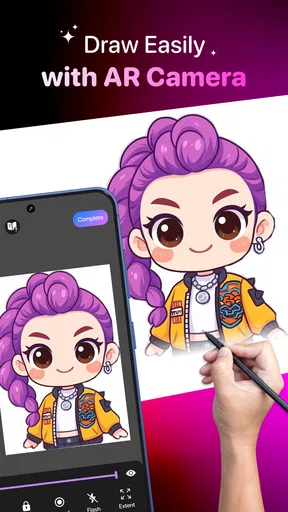
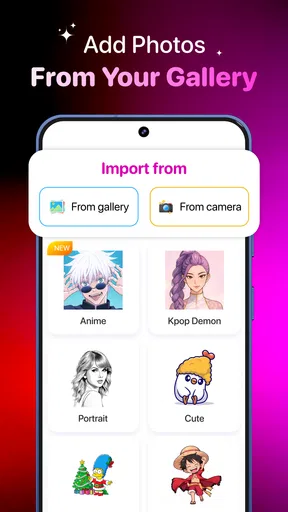
So, what exactly is AR Art Draw: Trace & Paint? At its core, this app allows you to trace images using your phone's camera and augmented reality technology. It’s like having a personal art tutor with you at all times. You start by choosing an image from the app’s gallery or uploading your own. Then, the magic happens: the app projects this image onto a drawing surface of your choice through your phone’s screen. You can adjust the size and position to fit your paper perfectly.
The first time I tried this, I felt like a kid in a candy store. There’s something incredibly satisfying about seeing a complex image simplified into traceable lines right before your eyes. Plus, it’s super beginner-friendly. Even if your artistic skills are limited to a stick figure, you’ll find yourself creating art that’s Instagram-worthy in no time.
Features That Make It a Must-Try
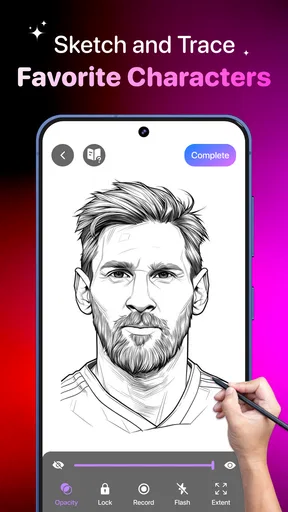
One of the standout features of this app is the variety of images available. Whether you're into landscapes, portraits, or abstract designs, there’s something for everyone. I spent hours just browsing through the gallery, feeling inspired at every turn. The option to upload your own images is a game-changer, too. Got a photo of your dog that you adore? Trace it and create a custom piece of art that’s personal and meaningful.
The app also boasts a user-friendly interface. Navigating through the app is a breeze, with intuitive buttons and options that don’t require a tech manual to understand. The tracing process is smooth, and the camera picks up surfaces accurately, allowing for seamless tracing.
For a realistic home project, I’d choose a clear photo with a distinct subject, such as a pet sitting against a plain background, rather than a busy scene with many overlapping details. A straightforward reference gives me a better chance of separating the important contours from visual clutter. If I am drawing with a child, I would prepare the paper and pencil first, choose an image together, and let them decide which details to add after tracing. That keeps the activity collaborative instead of turning it into a test of neatness.
It is also worth deciding what “finished” means before starting. A traced outline can be a complete result for a quick craft, while a more ambitious drawing might need extra time for color, texture, or personal touches. I would avoid choosing a photograph packed with tiny details for a first session; the overlay may show plenty to follow, but faithfully copying every mark can make a relaxing activity feel like a chore. A simpler subject is often more satisfying, even if it looks less impressive on the screen.
For a gift, I would use the tracing stage to get the broad shape onto the page, then put the phone aside and personalize the drawing with a name, a small background, or a different color choice. That approach preserves the helpful reference without making the finished piece feel like a mechanical copy. It is a useful compromise for anyone who wants a recognizable subject but still wants the final work to feel personal.
The Experience of Tracing with AR
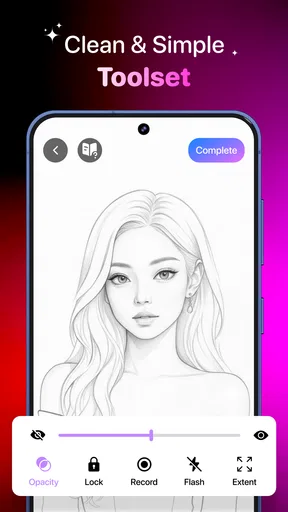
Once you’ve selected an image, the app overlays it onto your drawing surface using AR. Here’s where the real fun begins. With your phone positioned over your surface, you can start tracing. I found it helpful to use a phone stand to keep my device steady while I worked. It’s like coloring inside the lines, but way cooler. The app lets you adjust the opacity of the image, so you can make it as faint or as bold as you need.
Opacity is more than a cosmetic setting: it can change how comfortable the whole session feels. A bold guide is easier to see at a glance, while a lighter one leaves more room to judge your own pencil marks. I would start with the guide clear enough to follow, then reduce its visual weight if I find myself copying every small contour without thinking. That makes the tool feel more like a reference than a stencil and can help preserve a little freedom in the finished drawing.
One small workflow choice makes a difference: divide the drawing into passes. I would first trace only the main silhouette, pause to check the paper, and then return for interior details. This reduces the temptation to get lost in tiny features before the overall shape is in place. If the reference is complex, I would also take short breaks to relax my hand and check that the device has not shifted; a brief reset is less frustrating than discovering a misaligned guide near the end.
People often wonder whether this is mainly for children or whether adults can enjoy it too. I think it works for either, as long as the goal is a casual, physical drawing session rather than a serious digital-art workflow. A beginner can use it to get past the blank page, while an experienced artist might treat it as a quick composition experiment or a playful way to transfer a reference. Someone who wants layers, brush controls, undo history, or a polished digital export should look instead at a dedicated drawing app; the strength here is the paper-based process.
The app is free to download, with in-app purchases priced from around five to ten dollars per item. That makes it easy to try before deciding whether optional spending makes sense for your use. I would first see whether the basic workflow fits my routine and whether I enjoy drawing with a camera overlay, rather than paying simply because I expect a shortcut to better results. The app is for everyone, and it is listed in the art-and-design space, but that broad accessibility does not mean every feature or image choice will suit every project.
On the practical side, the current version is 1.14.2 and it runs on Android 7.0 or later. Zillion Fantasy is the developer. The app has a 4.4 average from around eleven thousand ratings and more than one million installs, which suggests that this approachable style of guided drawing has found an audience. I would still judge it by the way it fits my own setup: a steady phone, enough room to work, and a reference image that is not too complicated.
The biggest trade-off is that the overlay helps with placement but can also tempt me to focus on copying instead of understanding the image. To get more learning value, I would trace once, then try a second attempt using the first drawing as a reference rather than keeping the overlay in view. That simple two-pass exercise turns a guided craft into a more useful practice session, without pretending that tracing alone teaches every part of drawing.
For a first try, I would keep the setup modest: paper that will not slide, a comfortable drawing position, a stable phone support, and an image with a clear outline. If the camera view feels awkward or the image is hard to follow, I would simplify the subject rather than keep adjusting everything at once. The point is to make the first few minutes easy enough that I want to continue, not to build a perfect studio before making a mark.
Final Thoughts: A Creative Revolution
In a world where digital technology often pulls us away from traditional art forms, AR Art Draw: Trace & Paint brings them together in a harmonious blend. It’s more than just an app; it’s a gateway to creativity. Whether you’re a hobbyist or someone looking to explore art as a new venture, this app offers a delightful experience that’s both educational and entertaining.
My recommendation is specific: give it a try if you want a friendly way to start drawing on paper, make a personal craft, or experiment with tracing a photo. I would skip it if your priority is structured art instruction, advanced digital editing, or drawing without relying on an overlay. The AR approach is enjoyable when its limits match the project, and frustrating when you expect it to do the work of a course or a full illustration studio.
It is a free art-and-design app from Zillion Fantasy, rated for everyone and released on December 11, 2025. With its hands-on premise, it suits short creative sessions better than a demanding, multi-stage art project. I would keep the first attempt simple, treat the overlay as guidance rather than a guarantee, and decide afterward whether the process is something I would return to.
So, grab some paper, sharpen those pencils, and get ready to dive into the world of augmented reality art. Who knows? You might just discover a hidden talent you never knew you had. And hey, even if you don’t, you’ll have a lot of fun trying!
Pros
- Intuitive interface for easy tracing.
- Wide variety of templates available.
- Supports both beginners and pros.
- Offline mode for uninterrupted use.
- Regular updates with new features.
Cons
- Limited free features without subscription.
- Occasional lag on older devices.
- Ads can be intrusive at times.
- Requires camera permission to function.
- Some templates lack detailed instructions.
FAQs for AR Art Draw: Trace & Paint
What is AR Art Draw: Trace & Paint and how does it work?
AR Art Draw: Trace & Paint is an innovative app that uses augmented reality to help users trace and paint artworks. By projecting an image onto a physical surface, it allows users to follow outlines and create detailed drawings. This app is perfect for both beginners and experienced artists looking to improve their skills.
Is AR Art Draw: Trace & Paint suitable for beginners?
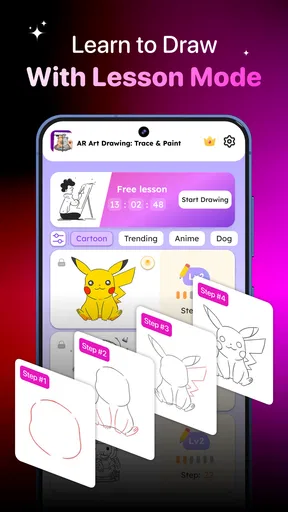
Absolutely! AR Art Draw: Trace & Paint is designed with user-friendly features that make it accessible for beginners. The app provides step-by-step guidance, allowing users to trace images accurately. It's a fantastic way to learn drawing techniques and gain confidence in your artistic abilities.
What devices are compatible with AR Art Draw: Trace & Paint?
AR Art Draw: Trace & Paint is available for both Android and iOS devices. It requires a smartphone or tablet equipped with AR capabilities. Make sure your device is updated to the latest version of its operating system to ensure the best performance and compatibility.
Are there any in-app purchases or subscription fees?
While AR Art Draw: Trace & Paint offers a range of free features, there are optional in-app purchases available. These may include additional image packs or premium tools to enhance the user experience. Check the app's store page for detailed information on pricing and subscription options.
How can I share my artwork created with AR Art Draw: Trace & Paint?
Sharing your artwork is simple with AR Art Draw: Trace & Paint. Once you've completed your masterpiece, the app allows you to save it directly to your device. You can then share it via social media or messaging apps, or print it out to display at home. It's a great way to showcase your creativity!


